The Adoric 0-6 Inch Digital Caliper is the first pick for most household and DIY measuring. It covers 0 to 6 inches, which handles board thickness, dowels, bolts and drill bits, and one button switches the display between inches and millimeters. It also measures four ways: inside and outside diameter, depth and step. That means one tool can check the width of a mortise, the outside of a tenon and the depth of a drilled hole.
The best caliper for you depends on the work. The other picks cover finer resolution for tight fits and fraction readouts that match your tape measure. Each pick below states what it suits, along with its limits.
As an Amazon Associate we earn from qualifying purchases.
How we picked: from products sold on Amazon for this need, compared by what their makers state and what buyers report in their reviews.
The Picks at a Glance
Product | Best for | Item dimensions l x w | Product dimensions | Material | Buyer rating | |
|---|---|---|---|---|---|---|
Adoric 0-6 Inch Digital Caliper | household DIY jobs | 9.45″L x 3.07″W | 9.45″L x 3.07″W | Plastic | 4.5 of 5 (38,283 reviews) | |
NEIKO 01407A Digital Caliper | reading fractions | 6″L x 1″W | 6″L x 1″W | Stainless Steel | 4.4 of 5 (19,426 reviews) | |
HARDELL 12 Inch Digital Caliper | larger stock | — | — | Stainless Steel | 4.6 of 5 (1,699 reviews) | |
Starrett Electronic Slide Caliper | machinist-grade work | 10.1″L x 5″W | 10.1″L x 5″W | Stainless Steel | 4.5 of 5 (380 reviews) | |
iGAGING Absolute Origin Caliper | logging measurements | 10″L x 3.75″W | 10″L x 3.75″W | Stainless Steel | 4.5 of 5 (1,905 reviews) |
Buyer ratings as shown on Amazon on November 16, 2026; they change.
Adoric 0-6 Inch Digital Caliper: Best for household DIY jobs

The Adoric 0-6 Inch Digital Caliper is the first pick for household DIY jobs. It measures from 0 to 6 inches with a resolution of 0.01 in (0.1 mm) and an accuracy of +/-0.01 in, and the maker pitches it for household and DIY measuring. That covers jobs like sizing a dowel, checking a drill bit, or matching a bolt at the hardware store.
The maker lists four measuring modes: inside and outside diameter, depth and step, using two sets of jaws and a probe. In practice you can read the outside of a pipe, the inside of a hole, and how deep a mortise or drilled hole runs with one tool. A single button switches between inch and millimeter, which helps when a plan is in metric but your lumber and hardware are in inches.
The zero button lets you set zero at any point on the scale and start a new measurement from there. Say you want to know how much thicker one board is than another: close the jaws on the first board, press zero, then measure the second, and the screen shows only the difference. The large LCD turns itself off after 5 minutes without use to save the battery, so a forgotten caliper on the bench is less likely to drain its LR44 cell.
Pros
Four measuring modes in one tool
One-button inch/mm switch and zero setting
Buyers say it is simple to use and the large display is easy to read
Buyers mention that extra batteries come included
Cons
Buyers report the plastic body feels flimsy and can break if dropped
Accuracy of +/-0.01 in is coarser than the 0.001 in of the NEIKO, Starrett and iGAGING picks, which matters for tight joinery or fitting parts within a few thousandths
Some buyers say the battery can fall out
If you need finer accuracy for close-fitting parts, look at the NEIKO 01407A or the Starrett Electronic Slide Caliper instead.
NEIKO 01407A Digital Caliper: Best for reading fractions

The NEIKO 01407A is the pick for woodworkers who think in fractions, because one quick-change button switches the display between inch, fraction and millimeter modes. If your plans, tape measure and drill bit index all speak in 1/16s and 1/32s, you can read a board’s thickness as a fraction and skip the decimal conversion chart.
Its resolution is 0.0005 in, 1/128 in or 0.01 mm, with an accuracy of 0.001 in. In practice, a 3/4 in plywood sheet that runs a hair under size shows up as a fraction you can match to a router bit or dado setting. The 1/128 in step is finer than any mark on a shop tape, so the reading is well past what you can see by eye.
The body is polished stainless steel, with a knurled thumb roller and a locking screw for holding a setting while you mark a cut. It is splash and dust resistant, which suits a shop where sawdust settles on everything. It measures inside, outside, depth and step, runs on one LR44 battery (included), and comes with a hard case.
Pros
Fraction mode reads directly in tape-measure terms
Stainless steel build and a large LCD screen
Buyers say it is easy to use, simpler than a ruler or tape
Buyers find it sturdy and good value for the money
Cons
Some buyers report the caliper stopped working after a few months
Buyers complain the battery drains quickly, so keep spare LR44 cells in the case
If you mostly measure boards wider than 6 in, look at the HARDELL 12 Inch Digital Caliper instead.
HARDELL 12 Inch Digital Caliper: Best for larger stock
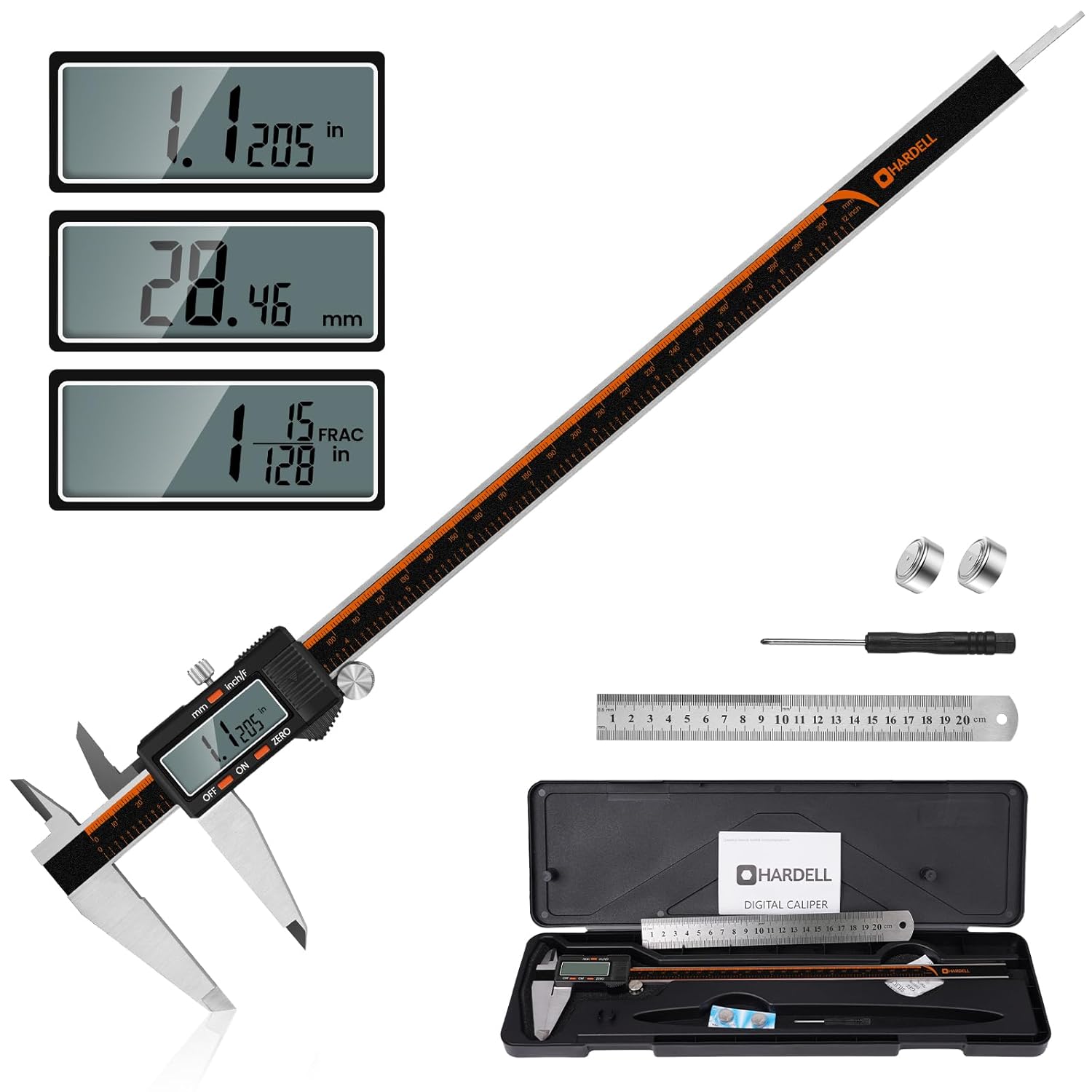
The HARDELL 12 Inch Digital Caliper is the pick when your work is wider than a 6-inch caliper can span, such as measuring across a glued-up panel, a wide board or a large pipe. It measures from 0 to 12 inches and has a 14 mm x 40 mm LCD. That reach lets you take a reading across stock you would otherwise have to estimate with a tape.
The maker lists accuracy of 0.0015 inches and resolution of 0.0005 inches. The display steps in tiny increments, and the reading itself is good to about a thousandth and a half. That is plenty for checking board thickness, dado widths or hardware sizes in woodworking. A knurled thumb roller moves the jaw, and a locking screw holds it in place. You can roll the jaw onto a board edge with one thumb, then lock it and carry the setting over to mark a matching piece.
The body is stainless steel and the maker calls it waterproof and rustproof. A damp shop or garage is less likely to leave rust spots on the beam. It also switches between inches, millimeters and fractions with one button, and turns itself off after 5 minutes of non-use to save the battery. If you step away to make a cut, expect to switch it back on when you return.
Pros
The 12-inch reach handles wide stock
The oversized display is easy to read
Buyers say the jaw slides smoothly without catching
It comes with a protective case and an extra battery
Cons
The longer beam is bulkier to carry in an apron or toolbox and takes more drawer space than a 6-inch caliper
If most of your measuring is small parts and you want the most compact tool, the 6-inch Adoric is the better fit.
Starrett Electronic Slide Caliper: Best for machinist-grade work

The Starrett Electronic Slide Caliper is the pick for machinist-grade work: it covers 0-6 inches, reads to 0.0005 in, and has hardened stainless steel measuring surfaces. Choose it if you fit joinery, hardware or metal parts where a few thousandths of an inch decide whether a part slides in or binds.
The maker rates it at +/- .001 in across the full 0-6 in range. That means a reading of 0.750 in on a dowel is within one thousandth of the true size, close enough to size a bushing or check a planer setting. The inch/mm conversion reads 0.01 mm or .0005 in, so you can switch to metric for imported hardware without losing detail.
The large, high-contrast LCD is easy to read without squinting, which helps under dim shop lights or when you hold the tool at an angle. The caliper turns off after 30 minutes with no slide movement, and pressing a button for one second or moving the slide brings the display back with no loss of position. In practice you can set it down mid-project, come back later, and keep measuring from the same zero. A fine adjustment thumb wheel lets you creep the jaw onto a part instead of pushing the slide by hand.
Pros
Fine 0.0005 in resolution for close fits
Hardened stainless measuring surfaces resist corrosion
Display wakes without losing its position
Thumb wheel for fine adjustment
Cons
At 10.1 in long by 5 in wide, it takes more drawer space than the Adoric (9.45 in by 3.07 in), which matters if it lives in a small tool bag.
It runs on one nonstandard battery, so you cannot grab a common replacement from the kitchen drawer.
If you want to log measurements straight to a computer, the iGAGING Absolute Origin Caliper fits that job better.
iGAGING Absolute Origin Caliper: Best for logging measurements

The iGAGING Absolute Origin caliper is the pick if you want your measurements to go straight into a computer instead of onto a scrap of paper. It has an SPC/USB data output port for sending readings into CAD software or spreadsheets, and it keeps its zero reference even after you switch it off. That combination suits makers who record a lot of dimensions, such as cataloging hardware sizes or drawing up plans for a furniture build.
The absolute origin feature means the caliper remembers where zero is when it powers down. In daily use, you can turn it off between cuts and pick it back up without closing the jaws and re-zeroing each time, which keeps readings consistent across a long session.
The data port matters when you measure many parts in a row. Rather than reading the screen and typing 0.750 into a spreadsheet, you send the value directly, so you skip typos from manual entry. The maker rates it IP54 against dust and moisture and builds it from stainless steel, with outdoor woodworking named as a use. That helps in a dusty shop where fine sawdust settles on everything. It also has a high-contrast LCD for low light, and it comes with a protective case and an instruction manual. Accuracy is 0.001″, with a 0-6 inch range.
Pros
Readings export to CAD or spreadsheets
Zero stays set after power-off
Buyers say it feels solidly built and is simple to use
Buyers report the included battery lasts a long time
Cons
Some buyers are unhappy with how the automatic shut-off works
At 10″L x 3.75″W, it is a larger tool to pocket than the NEIKO 01407A at 6″L x 1″W
If you only need quick household measurements and never log data, the Adoric is the simpler choice.
What to look for in a caliper
Start with how big your work is, then how fine a reading you need, and only then look at extras. A caliper that fits your stock and reads in units you already use will get picked up far more often than a pricier one that doesn’t.
A 6-inch caliper handles most shop and household jobs: dowels, screws, drill bits, plywood thickness and hinge recesses. Step up to a 12-inch model when you measure wide boards or big panels, since a 0-12 in range covers stock that a 6-inch tool can’t span.
Resolution is the smallest step the screen shows. Accuracy is how close that number is to the true size. A caliper that reads to 0.01 in and is accurate to +/-0.01 in can be off by about a hundredth of an inch. That’s fine for checking board thickness but loose for snug joinery. One accurate to 0.001 in gets you ten times closer.
A fraction mode helps if you work from a tape measure. Some calipers switch between inch, fraction and millimeter with one button, with fractions down to 1/128 in. That way a reading such as 23/32 in matches your plans directly.
For shop life, stainless steel holds up better than a plastic body. Buyers of plastic calipers complain they feel flimsy and can break if dropped. An IP54 rating means the caliper is built to resist dust and moisture. Extras worth knowing about are absolute origin, which keeps your zero point after the caliper turns off, and SPC/USB output for sending readings to a spreadsheet.
The pick to start with
Adoric is the first pick for household DIY measuring: it handles the everyday jobs around a house, like sizing a drill bit, checking board thickness or measuring a pipe’s inside diameter, with simple inch/mm switching. Its 0-6 in range covers most of that work, so you’re not storing a long tool for measurements you rarely take.
Your next step is to settle on range before anything else. If your projects stay within 6 in, start with a 6 in caliper. If you regularly measure wide boards or larger stock, go straight to a 12 in model, which reaches 0-12 in.


